
System status
System is the honest answer to “why is nothing happening”. It lists the compute nodes you can reach and the queues you may submit to, with their current state.
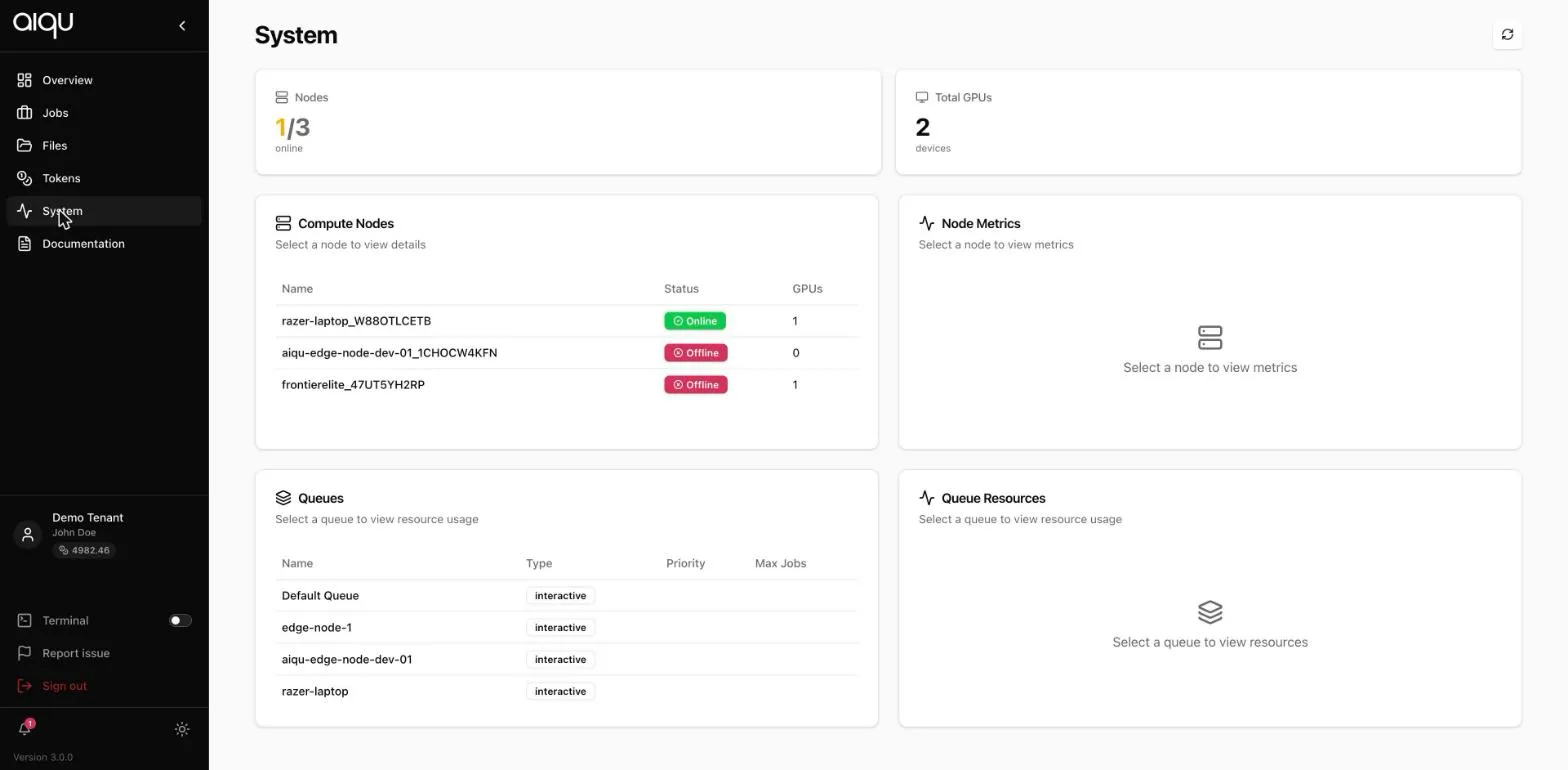
Compute nodes
Section titled “Compute nodes”Every node your tenant can use, with:
- Status - Online or Offline. Offline nodes take no jobs.
- GPUs - how many the node contributes.
Select a node to load its metrics into the panel on the right.
A node being offline is not an error you can fix from here. It means the machine is off, has lost its tunnel to the central server, or has been disabled by an administrator.
Queues
Section titled “Queues”The queues you have access to, with their type and limits.
Type is the one that changes how you submit:
| Type | What it means |
|---|---|
interactive |
Jobs have a runtime and a shell. The default. |
non-interactive |
Jobs run a command and exit. A command is required. |
hybrid |
You choose per job. |
Select a queue to see its resource usage on the right.
Reading it together
Section titled “Reading it together”The combination that matters is a queue whose nodes are all offline. The queue still appears, still accepts a selection in the job form, and then refuses the job with “This queue has no node that can run a job right now.”
Checking here first saves filling in a form you cannot submit.