
Operating the platform
Superadmin
A superadmin owns the installation rather than any one tenant. Signed in as one, the navigation collapses to four entries - Tenants, Nodes, Queues, System Settings - and the ordinary tenant pages disappear, because a superadmin is not in a tenant until they deliberately enter one.
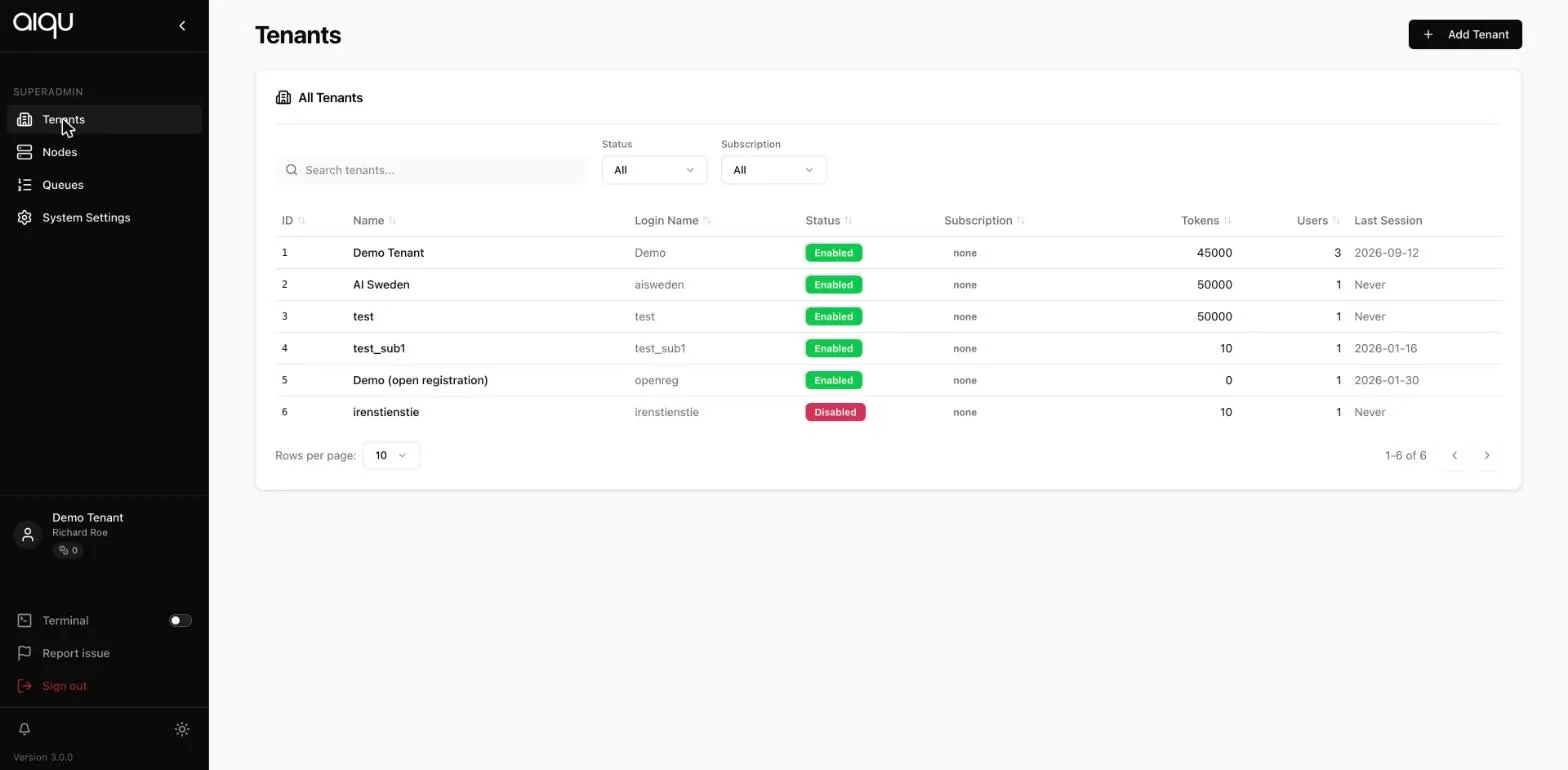
TenantsCreating, editing, disabling and inspecting tenants.
Entering a tenantWorking inside a tenant, and acting as one of its users.
Global nodesMachines shared across tenants.
Global queuesQueues shared across tenants, and their cost factors.
System settingsToken pricing, platform mail, registration, relays and vitals.
What only you can do
Section titled “What only you can do”- Create, disable and price tenants
- Set the token economy - what a token costs and what resources cost
- Configure the platform SMTP relay and the support address
- Allow or forbid self-service tenant registration
- Promote a node or queue to global
- Configure the relay that carries traffic to remote nodes
- Manage global Docker registries
What you deliberately cannot do from here
Section titled “What you deliberately cannot do from here”You do not administer a tenant from the superadmin navigation. To change a tenant’s users, queues or storage, you enter the tenant and act as its administrator - see Working inside a tenant. That boundary is what keeps tenant administration auditable.