Projects
A User or UserGroup can be a part of a Project. Membership confers the ability to queue jobs which draws Tokens from the Project instead of from the User’s Account. It also grants access to project-specific Storage.
An admin can create a project by clicking the “Add Project”-button in the upper right corner and specifying the name and a Storage Bucket that the members should have access to (None is also choosable).
Edit Project details
To edit a project click on the corresponding row in the projects table. This will open the “Project Details” pop-up window
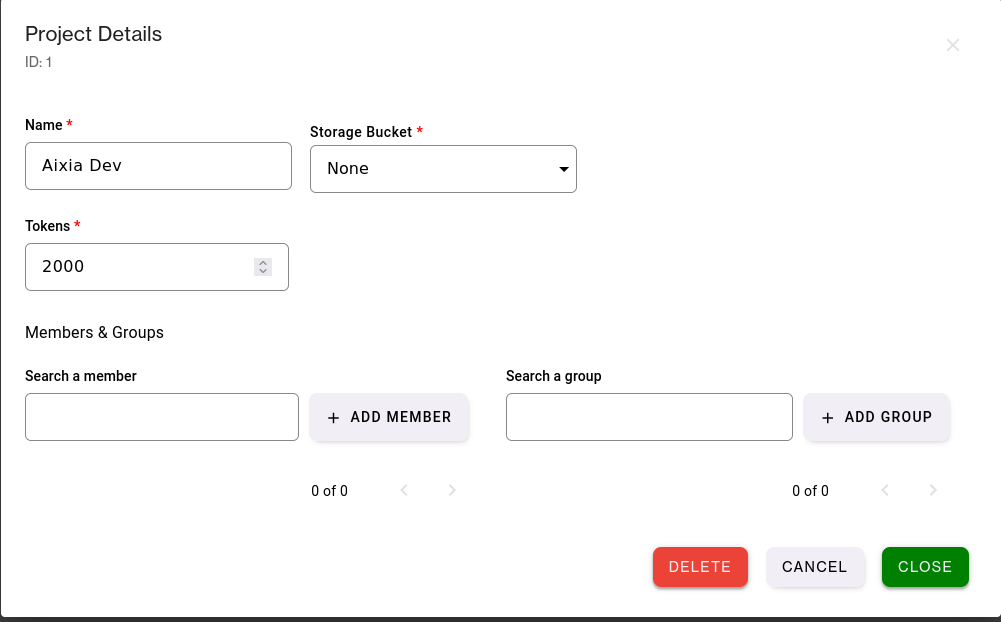
ID: The systems ID for the project.
Name: Change the name of the project.
Storage Bucket: Storage Bucket the project has access to, None or select from list.
Tokens: Modify the total amount of tokens the project has access to.
Members and Groups: Individual users and whole user groups are managed in separate sections — search to add a member or a group to the project.
Read/Write: Each member and each group has its own toggle for read or read/write access.
Delete: Delete the project.